- 661.2K
- 15.2K
- 504
- 0%
In the world of solid-state drives (SSDs), M.2 SSDs have become increasingly popular due to their compact size, ease of installation, and high performance. However, did you know that M.2 SSDs come in two different form factors, each with its own unique characteristics and advantages? In this article, we will delve into the world of M.2 SSDs and explore the differences between SATA and PCIe M.2 SSDs.
What is a SATA M.2 SSD?
SATA M.2 SSDs use the SATA interface, which is the same interface used by traditional 2.5-inch SATA SSDs. These drives are designed to be compatible with a wide range of systems, including older models, and are often more affordable than PCIe M.2 SSDs. However, their performance is limited by the SATA 3.0 spec, which tops out at around 600MB/s.
What is a PCIe M.2 SSD?
PCIe M.2 SSDs, on the other hand, use the PCIe interface, which is a more modern and faster protocol. These drives are capable of reaching speeds of up to 2000MB/s (Gen 2 x4 lanes) or even 4000MB/s (Gen 3 x4 lanes). This makes them ideal for users who require high-performance storage for applications such as gaming, video editing, and data-intensive tasks.
The Difference Between SATA and PCIe M.2 SSDs
So, what's the main difference between SATA and PCIe M.2 SSDs? The primary difference lies in their performance and protocol. SATA M.2 SSDs use the same controller as traditional 2.5-inch SATA SSDs, while PCIe M.2 SSDs use a controller specifically designed to support the PCIe protocol. This results in significantly faster performance for PCIe M.2 SSDs.
Real-World Performance Comparison
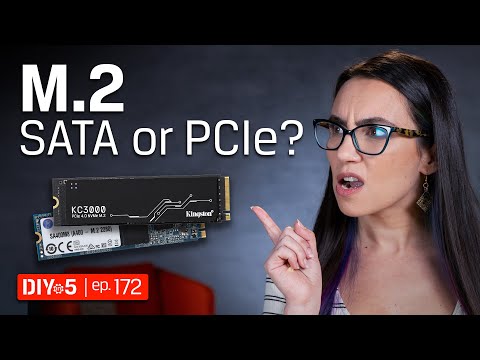
To illustrate the difference in performance, let's compare two popular M.2 SSDs: the Kingston A400 SATA SSD and the Kingston KC3000 PCIe NVMe SSD. The A400 has a capacity of up to 480GB, with read and write speeds of up to 500MB/s and 450MB/s, respectively. In contrast, the KC3000 offers read and write speeds of up to 7000MB/s, with capacities up to 4TB. As you can see, the KC3000 is significantly faster and more capable than the A400.
Strengths and Weaknesses of SATA M.2 SSDs
While SATA M.2 SSDs have their limitations, they still offer several advantages. They are often more affordable than PCIe M.2 SSDs, making them a great option for users on a budget. Additionally, they are more compatible with older systems and can be a good choice for users who don't require high-performance storage.
Strengths and Weaknesses of PCIe M.2 SSDs
PCIe M.2 SSDs, on the other hand, offer several strengths that make them ideal for users who require high-performance storage. They are significantly faster than SATA M.2 SSDs, making them perfect for applications such as gaming, video editing, and data-intensive tasks. However, they are often more expensive than SATA M.2 SSDs and may require a more powerful system to reach their full potential.
Alternate Products
Samsung 970 EVO Plus : A high-performance PCIe M.2 SSD with read and write speeds of up to 7000MB/s.
Western Digital Black SN750 : A fast and affordable PCIe M.2 SSD with read and write speeds of up to 3500MB/s.
Crucial P1 : A budget-friendly SATA M.2 SSD with read and write speeds of up to 1000MB/s.
Conclusion
In conclusion, SATA and PCIe M.2 SSDs are two distinct types of storage solutions that cater to different needs and budgets. While SATA M.2 SSDs offer affordability and compatibility with older systems, PCIe M.2 SSDs provide significantly faster performance and are ideal for users who require high-performance storage. Ultimately, the choice between SATA and PCIe M.2 SSDs depends on your specific needs and requirements.
Where to Buy
AI-Based Analysis of User Comments
Audience Intent Signals
- 🛒 Buying Interest: Low
- 🤔 Comparison Questions: Low
- 😕 Confusion Level: Medium
- 👍 Appreciation: Very Low
- 👍 0
- 😐 20
- 👎 0
Viewer Comments
Is it really up to us? Or what will work in our computer. I have a Dell 5490 and tried to put in a SanDisk Extreme M.2 NvMe SSD and computer would not recognize it. Put the other M.2 back in which had 2 notches and still worked fine.
NeutralExcellent video. Thanks.
Neutralm.2 yes they work i use it as a hdd 1 tb. the heatsink is for show i did test that .
NeutralDoes not explain those SSD marketed or labeled "PCI-e" or "PCIe" but do not have or denote "NVMe" anywhere in the specs or labeling, nor SATA of any sort. i.e. like there are PCI-E non-NVMe (AHCI??) and PCI-E NVME.
NeutralTrisha Hershberger came in clutch once again. I was trying to run SATA on my PCiE drive for hours and couldn’t figure out what to change on the boot up screen. Thank you thank you 🙏
NeutralI want to purchase Kingston m.2 sata ssd but sadly you don't make it anymore 🙁
Neutralgreat info ....thanksss
NeutralNote that nvme cannot be used on SATA only.. you need pcie connections or to USB for external.
NeutralTHANK YOU SO MUCH FOR THAT!!!! I swear, I must've been living in a cave or something because I couldn't understand the huge differences in price and speeds when I'd see the ads for these M.2 drives!! I mean, I'd see an Amazon ad showing a 1TB NVMe M.2 drive for maybe or (or sometimes I think I saw some for even half that price), and then I'd see another ad for another 1TB NVMe M.2 drive, (manufactured by the same company selling the first for ) but it would cost well over 0! I'd guessed that it was maybe because the later was a 2280 size and the former was maybe a 2230 or 2242. But now I'm pretty sure that the cheaper one was a M.2 SATA drive. I'm presently building a new system from the ground up (Case and all). So, I recently bought two NVMe M.2 Drives (2280). One is a 1TB cap and the other is a 2TB cap. After Watching your video, I rushed to the packages for both and thankfully, they were both M.2 PCIe, Gen 5x4 (they both read at 14900MB/s and Write at 14000MB/s). The 1TB cost 0 and the 2TB cost 0. So, thanks again for that clarification! Rich
NeutralI like your hair highlights!
NeutralM2 satan is what. ???
NeutralAnyone from Bangladesh? 🇧🇩
NeutralTotally get the difference now. Thanks
NeutralI bought the PCIe. Works great.
NeutralI admit when I first heard there are M.2 SATA and NVME SSDs it confused me a little bit. I was having questions about do they work in the same slots and how to tell the difference. Now I know. Just watch out for mSATA, it has one notch unlike the M.2 SATA and if you don't know what to buy you may get something that does not even fit! The biggest problem is even if it does fit, the performance will not be as great. It may not be so terrible and it may be enough for most peoples' needs but someone looking for performance for any reason will probably see the difference in performance.
NeutralDuring the A400 SATA vs KC3000 PCIe NVMe it would have been more useful to post the performance numbers, not the notches which we can see, we can’t see the performance differences. Outside of that, outstanding video.
NeutralWow so glad I ran into this video, thank you for breaking this down.
NeutralThank youuuuu!!!!!!! Great video.
Neutralvery useful .....
Neutralhow did i just found you???
NeutralFrequently Asked by Viewers
Q: Is it really up to us? Or what will work in our computer. I have a Dell 5490 and tried to put in a SanDisk Extreme M.2 NvMe SSD and computer would not recognize it. Put the other M.2 back in which had 2 notches and still worked fine.
A: This question appears frequently among viewers.
Q: Does not explain those SSD marketed or labeled "PCI-e" or "PCIe" but do not have or denote "NVMe" anywhere in the specs or labeling, nor SATA of any sort. i.e. like there are PCI-E non-NVMe (AHCI??) and PCI-E NVME.
A: This question appears frequently among viewers.
Q: M2 satan is what. ???
A: This question appears frequently among viewers.